
Home / Two modes
Self declaration or fuzzy declaration: two ways to fill the same box
Oopbuy added two declaration modes so you can choose how much of the form you control. Both end with the same result: a description and an amount that customs reads. Here is what each mode asks of you.
What Oopbuy is, before the declaration
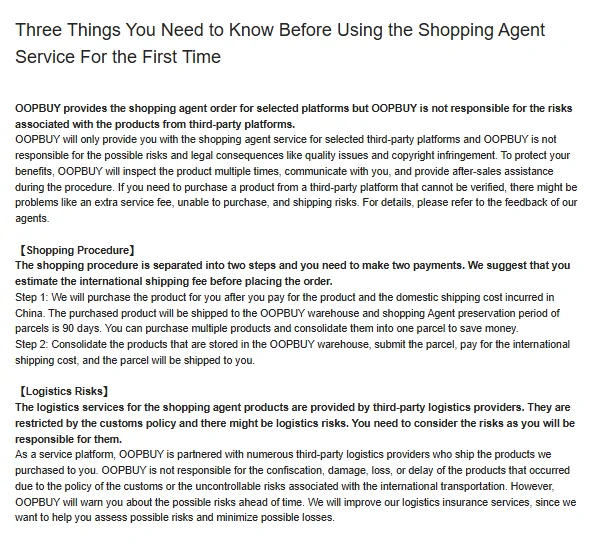
Oopbuy is a shopping agent run by Openbuy Technology HK Limited (company number 77213008). It buys items for you from Taobao, 1688, Weidian and other links, receives them at a warehouse in Xiamen, inspects incoming parcels under its published rules, with sealed-item exceptions, and ships them abroad on routes run by third-party carriers.
Its Three Things page splits an order into two payments: the goods first, then international shipping once you submit a parcel. The declaration belongs to the second payment.
Self declaration: the system fills it, you correct it
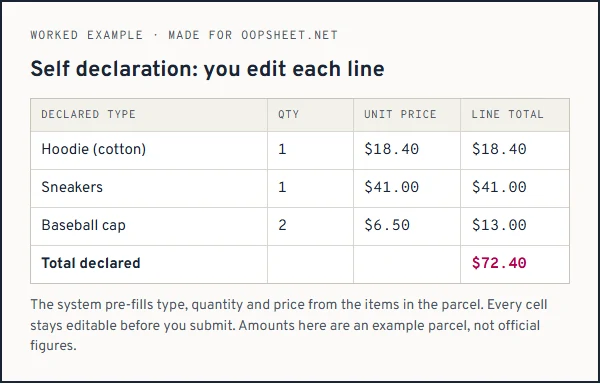
In self declaration, Oopbuy generates the declaration from the product information in the parcel. You then edit it: declared types, quantities, declared unit prices and total prices. Think of it as a draft written by someone who has only seen the order page.
That draft is a starting point, not an answer. Product titles from Chinese marketplaces are often long and vague, and the pre-filled type may say something broad where a specific word would serve you better. You are allowed to fix that, and it is worth the minute it takes.
Fuzzy declaration: one total, the system writes the lines
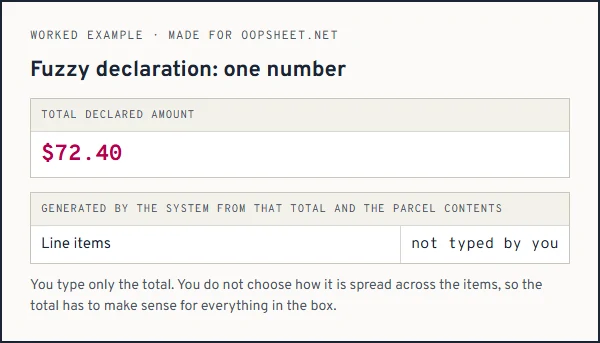
In fuzzy declaration you only fill in the total declared amount. The system then generates the declaration information from that amount and the parcel contents.
It is quicker, and for a parcel of one kind of item it is often enough. The trade is control: you no longer decide how the amount is shared across items, so the single total has to be reasonable for everything in the box at once.
The official wording of both modes
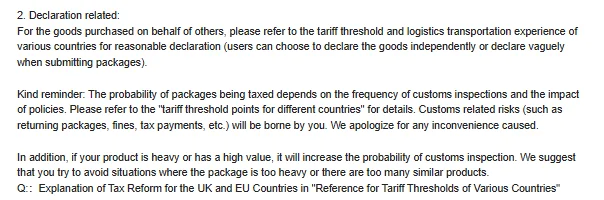
“As long as the amount you declare is reasonable, it is up to you to decide how you want to declare it.”
From the official help page “How to choose the declaration method”, read on 10 October 2026.
That sentence describes the operator’s guidance for those examples; it does not replace the destination’s valuation rules. Oopbuy gives you the choice of mode and the choice of amount, and attaches one condition: reasonable. The three examples it gives of unreasonable declarations show where that condition ends, and the Customs and Taxation page adds that customs risks such as returns, fines and tax payments are borne by the user.
Which mode suits which parcel
Use self declaration when the box mixes item types, when the pre-filled names are vague, or when one item is worth far more than the rest. You want each of those to appear as its own believable line.
Fuzzy declaration fits a parcel of one item type in a few pieces, where a single total describes it honestly. If you cannot say what you paid, neither mode will help: find your order receipts first.
How to use Oopbuy and the Spreadsheet, step by step
Here is the whole route from a product pick to a declared parcel, so you can see where the mode choice falls.
- Find an item on the Oopbuy Spreadsheet or search for it by name.
- Paste the link into Oopbuy, choose size and colour, submit the order and pay for the goods.
- Wait for the seller to ship to the Xiamen warehouse. The warehouse opens, checks and weighs each package.
- In the warehouse tab, select items marked Available for Parcel Creation and click Create Parcel.
- Choose the address, the route, packing and add-ons, then complete the declaration in self or fuzzy mode.
- Apply one shipping coupon if you have one, pay shipping, and keep the invoice for customs.
If you do not have an account yet, you can open an Oopbuy account; the link carries this site's referral tag.
Two mistakes people make with the modes
The first is treating fuzzy declaration as a way to avoid thinking. It is a shortcut for typing, not for the decision. The total still has to fit the box.
The second is accepting every pre-filled line in self declaration. A line that says only “clothing” for a pair of shoes, two hoodies and a belt is technically filled in, but it describes nothing. Edit the types so that someone opening the box would agree with them.

Questions about the modes
Can I switch modes after submitting?
Oopbuy's pages do not describe switching after submission. On routes using the IOSS tax service they state that the declared total cannot be modified after submission; you cancel the parcel and resubmit. Plan to decide before you press submit.
Does fuzzy declaration hide what is in the parcel?
No. The system generates the lines from the parcel contents. Fuzzy mode changes who types the lines, not whether they exist.
Is one mode safer at customs?
Oopbuy does not say so. What it does say is that unreasonable declarations may affect clearance. A reasonable declaration in either mode is the target.
Next on the form: the amount itself.
Setting the declared value